
Focus sessions
A focus app that blocks the apps, not just the time
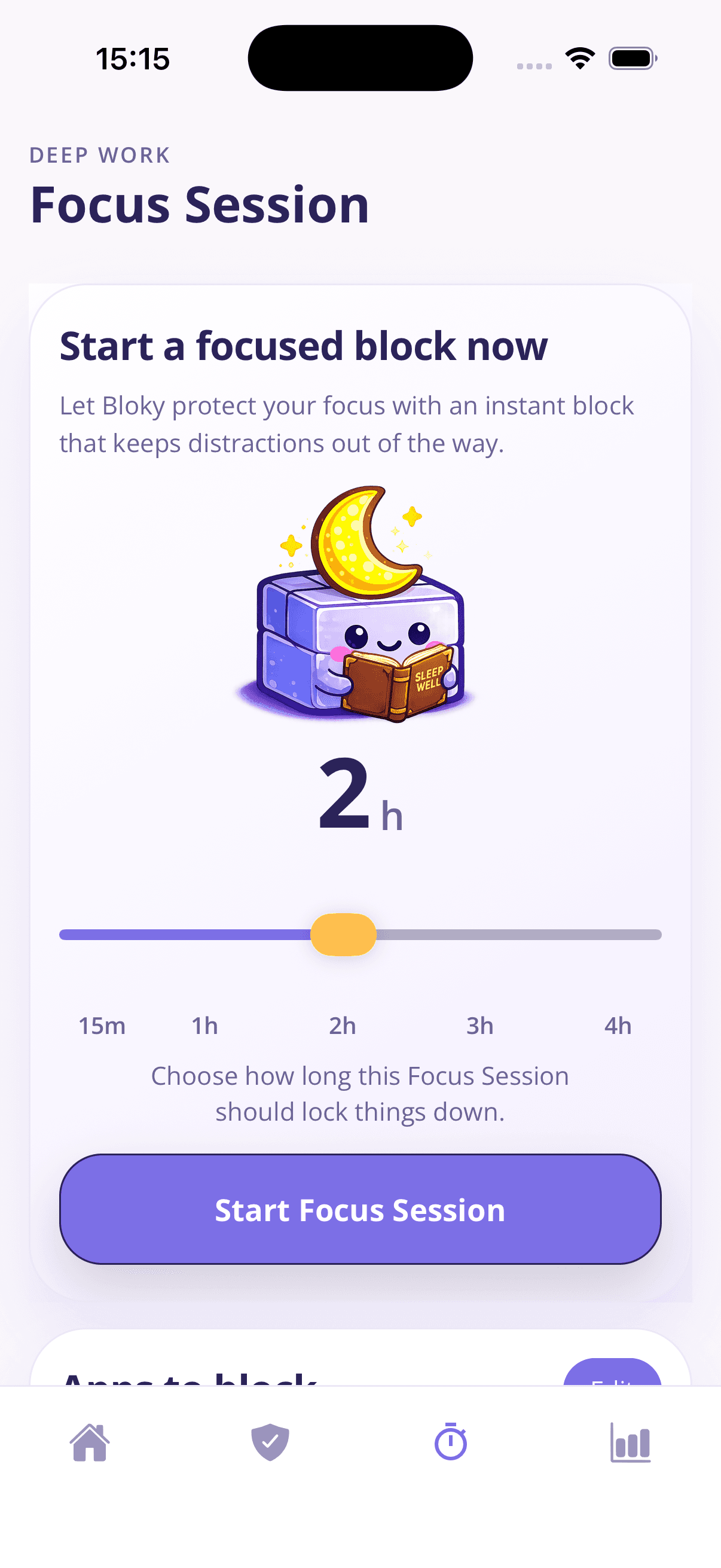
Pomodoro timers measure your distraction; they don't prevent it. Bloky's focus sessions actually lock your distracting apps away — for 15 minutes or 4 hours — so the tab-switch reflex hits a wall instead of a feed.
Why focus timers alone don't protect focus
Everyone who's tried a Pomodoro timer knows the failure mode: the timer runs faithfully in the corner while you check Instagram "for a second" — and the second becomes twenty minutes. A timer creates intention. It doesn't create protection.
Research on attention shows the real cost isn't the check itself but the switch: after an interruption it takes most people well over twenty minutes to fully re-enter deep work. Five "quick checks" can hollow out an entire afternoon while feeling like almost nothing.
Protection means the distracting apps are unavailable for the duration — not willpower, not a running clock, but a closed door. That's what a Bloky focus session is: pick a duration, tap start, and your chosen apps stay paused until the session ends.
How Bloky focus sessions work
The same blocking engine that guards your bedtime, available on demand for your workday.
15 minutes to 4 hours
Slide to the duration you need: a quick inbox sprint, a one-hour study block, or a full 4-hour deep work morning. One tap starts it.
Your own focus block list
Focus sessions use their own apps-to-block list, separate from your bedtime list — block social and games while keeping work tools open.
A wall, not a nag
Open a blocked app mid-session and you get Bloky's pause screen, not a dismissible reminder. The 20-tap pass exists for genuine emergencies.
Works alongside your bedtime schedule
Focus sessions are on-demand; the night schedule is automatic. Together they cover the two moments distraction costs you most.
No babysitting
Start the session and put the phone down. It ends on its own — no pausing, no check-ins, nothing to manage while you work.
Progress you can see
Your app time shows up in the weekly Bloky Report, so you can watch focused days translate into lower screen time.
Start your first session
- 1
Pick your block list
Choose which apps stay locked during focus — social, video, games, whatever pulls at you.
- 2
Slide to a duration
15 minutes to 4 hours, matched to the task in front of you.
- 3
Tap start and work
The apps stay quiet until the session ends. No timer to watch, no decisions to make.
Frequently asked questions
What people ask before their first focus session.
What's the best focus app for studying?
- For studying, the key feature is blocking, not timing — a timer can't stop the TikTok check between chapters. Bloky lets you start a session for exactly your study block (say 2 hours), locks your distracting apps for the duration, and leaves everything else usable. Pair it with your phone face-down across the room and you've covered both digital and physical temptation.
Is there an app that blocks other apps while I work?
- Yes — that's Bloky's focus session. You keep a dedicated list of apps to block during work, start a session of 15 minutes to 4 hours, and those apps show a pause screen until it ends. It works on both iPhone and Android.
How is a focus session different from a Pomodoro timer?
- A Pomodoro timer structures your time but leaves every distraction one tap away. A Bloky focus session structures your environment: the distracting apps are actually paused. You can still run Pomodoro-style intervals — start a 25-minute session per pomodoro, or one long session across several — but the feed can't win the break-time gamble.
Can I stop a focus session early?
- Bloky is built so ending early is possible but never frictionless — if you genuinely need a blocked app, the 20-tap pass gets you 5 minutes. That deliberate cost is the feature: it filters impulse from need, which is exactly the distinction a focus tool must enforce.
How long should a focus session be?
- Start with what you can genuinely finish: 25–50 minutes for most tasks, 90 minutes for deep work (matching a natural attention cycle), and 2–4 hours only for well-defined projects with breaks planned. Bloky's slider covers all of it — the best duration is the one you'll actually complete, because completed sessions build the habit.
Does Bloky work for ADHD focus problems?
- Many strategies recommended for ADHD — externalising discipline, reducing available distractions, short committed intervals, visible progress — map directly onto Bloky's design: the block does the resisting, sessions can be as short as 15 minutes, and streaks make progress concrete. It's not a treatment, but it's a tool that works with that wiring instead of against it.
Learn more
Guides that go deeper on the habit behind the problem.
How to block TikTok
Every way to block TikTok: built-in screen time limits, TikTok's own tools, and scheduled app blockers — with honest notes on which ones actually hold.
How to block Instagram
Block Instagram at night, during work, or on a schedule — every method for iPhone and Android compared, and why scheduled blocking beats quitting cold turkey.
Screen time before bed
How screens actually affect sleep — it's less about blue light than you think. What the research says, how long before bed to stop, and what genuinely helps.
Related solutions
App blocker for iPhone & Android
A strict-but-kind app blocker built around sleep, focus, and real behaviour change.
Block social media apps
Pause Instagram, TikTok, Snapchat, and more during the hours that matter.
Block apps at night
Set a nightly schedule that blocks distracting apps at bedtime and unlocks them in the morning.
Download Bloky
Your next deep work block starts now.
Download Bloky, set your focus list, and give yourself two undisturbed hours today.
Free to download on the App Store and Google Play. Premium includes a 3-day free trial.