
Bedtime app blocker
Block apps at night — automatically, every night
The hardest time to resist your phone is the moment you get into bed. Bloky blocks your chosen apps on a nightly schedule, so the decision to stop scrolling is already made before you're tired enough to lose it.
Why blocking apps at night beats trying to stop at night
Every night follows the same script: you get into bed intending to sleep, open one app "for a minute," and surface 90 minutes later, wired and annoyed with yourself. That's not a discipline problem. Feeds are engineered by teams of engineers to keep you watching, and at 11pm you're negotiating with them using a tired brain.
The fix is to move the decision earlier. When you set a blocking schedule in the afternoon, the well-rested version of you decides how the night goes. At bedtime there's nothing to resist — the apps simply aren't available, and bed goes back to being for sleep.
Built-in tools like iPhone Screen Time and Android Digital Wellbeing try to do this, but their limits collapse at one tap of "Ignore Limit." A dedicated bedtime app blocker needs to hold firm at the exact moment you want it least — and stay kind enough that you don't rip it out after three days.
How Bloky blocks apps at night
Bloky is built bedtime-first. One schedule, set once, protecting every night on autopilot.
A real nightly schedule
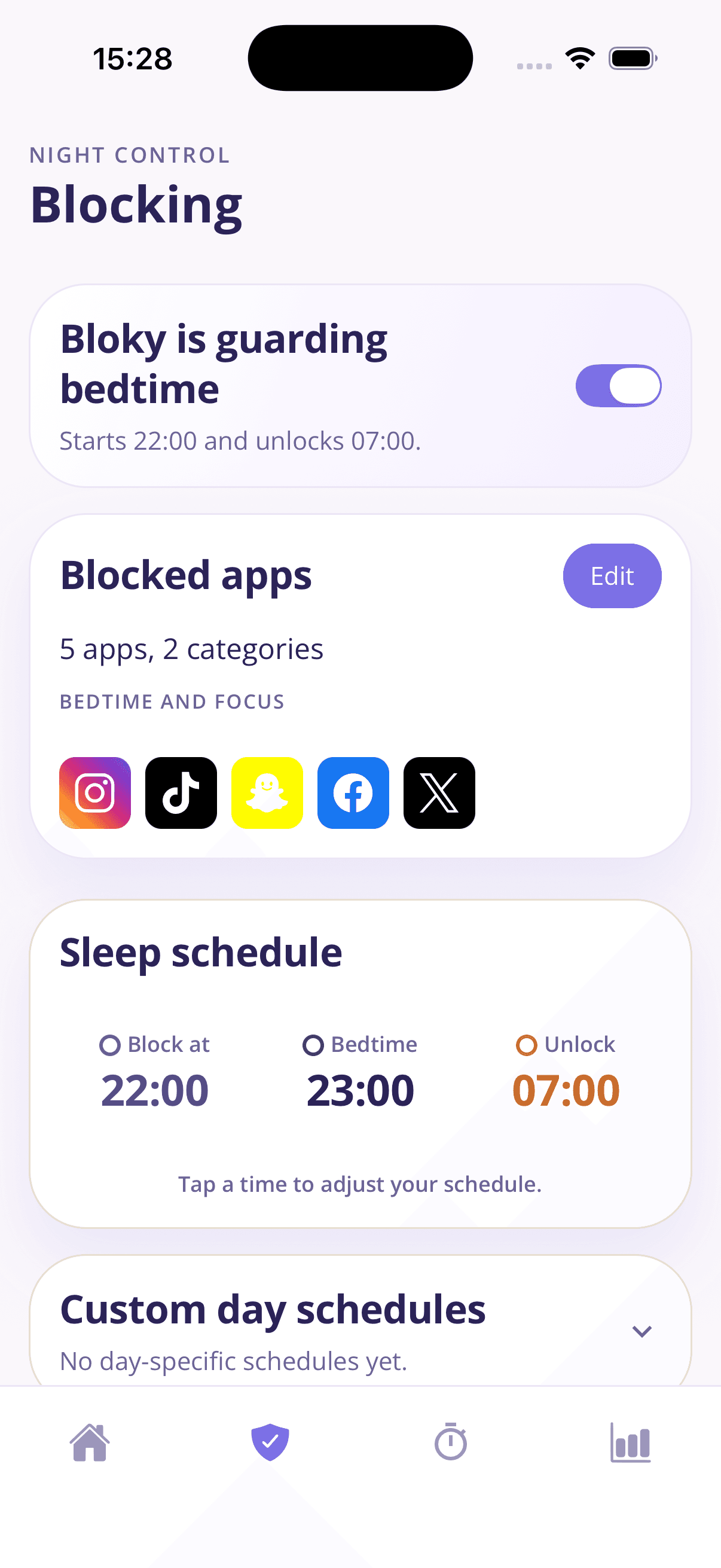
Set three times: when blocking starts, your bedtime, and your morning unlock — for example, block at 22:00, bedtime at 23:00, unlock at 07:00. Bloky runs it every night without being asked.
Block exactly the right apps
Choose individual apps like Instagram, TikTok, Snapchat, and X, or block entire categories at once. Your reading app or alarm stays available; the feeds don't.
Custom schedules per day
Weeknights and weekends are different. Give Friday a later block time and keep Sunday strict — Bloky follows a per-day schedule if you want one.
Friction instead of a hard lock
If you truly need a blocked app, tap Bloky 20 times for a 5-minute pass. Mindless opens stop cold; genuine needs still get through.
Streaks that make it stick
Every protected night extends your streak. It's a small thing — and it's surprisingly hard to break a 12-night streak for one more reel.
A weekly report that proves it
The Bloky Report compares this week's app time to last week's, so you can watch evening screen time fall — many users see a drop like 45% within weeks.
Set up your night block in two minutes
- 1
Pick your apps
Select the apps and categories that keep you up at night. Most people start with social media and video.
- 2
Set your three times
Choose when blocking starts, when bedtime is, and when apps unlock in the morning.
- 3
Let it run
Tonight, blocked apps show a calm pause screen instead of a feed. Tomorrow, your streak begins.
Frequently asked questions
Real questions people ask about blocking apps at night.
What's the best way to block apps at night on iPhone?
- iPhone Screen Time's Downtime can block apps on a schedule, but it's dismissible with one tap, which is why most people stop respecting it within days. A dedicated blocker like Bloky uses a nightly schedule with real friction: blocked apps show a pause screen, and overriding takes 20 deliberate taps for just a 5-minute pass. That gap between impulse and access is what actually changes the habit.
Can I block apps only during certain hours?
- Yes — that's exactly how Bloky works. You set a start time (say 22:00) and an unlock time (say 07:00), and your chosen apps are blocked only during that window. Outside those hours everything works normally, so it never gets in the way of your day.
Can I set different block times for different days?
- Yes. Bloky supports custom day schedules, so you can block earlier on work nights and give yourself a later start on Fridays and Saturdays. A schedule that matches your real life is far more likely to survive than one strict rule for every night.
What happens if I try to open a blocked app at night?
- Instead of the feed, you see a gentle full-screen pause: "Bedtime protection is on." If you genuinely need the app, you can tap the Bloky mascot 20 times to earn a 5-minute pass. It's enough friction to stop autopilot opens, without locking you out of your own phone.
Does blocking apps at night actually improve sleep?
- Sleep research consistently links bedtime phone use with later bedtimes, more disrupted sleep, and next-day tiredness — the American Academy of Sleep Medicine found that over a third of adults sleep worse because of bedtime scrolling. Removing the apps during your wind-down window removes the main trigger, and Bloky's weekly report lets you verify the change in your own numbers.
Is there a free app that blocks apps at night?
- Bloky is free to download on both the App Store and Google Play, and premium comes with a 3-day free trial — enough to run three full protected nights and see the difference before paying anything.
Learn more
Guides that go deeper on the habit behind the problem.
How to stop scrolling at night
Can't stop scrolling in bed? A practical 5-step plan: why willpower fails at night, how to set a digital sunset, and how to make the change stick within a week.
Bedtime routine for adults
A realistic bedtime routine for adults who currently 'wind down' by scrolling: a 60-minute template, why routines fail, and how to make yours automatic.
Screen time before bed
How screens actually affect sleep — it's less about blue light than you think. What the research says, how long before bed to stop, and what genuinely helps.
Related solutions
App blocker for iPhone & Android
A strict-but-kind app blocker built around sleep, focus, and real behaviour change.
Stop doomscrolling
Break the late-night scroll loop with scheduled blocks and gentle friction.
Block social media apps
Pause Instagram, TikTok, Snapchat, and more during the hours that matter.
Download Bloky
Make tonight the first protected night.
Download Bloky, set your schedule once, and let every night after that take care of itself.
Free to download on the App Store and Google Play. Premium includes a 3-day free trial.